Structure
Arrange mode
Build and maintain your server and device tree—groups, sites, hostnames, IP addresses, ports, and SSH profiles. Drag, organize, and keep connection details where your team expects them.
SSH keys never leave your device
DevAgent is built for real org structures—offices, sites, server groups—not one host at a time. Map your tree, set addresses and ports, then run the same operation across every server in a group.
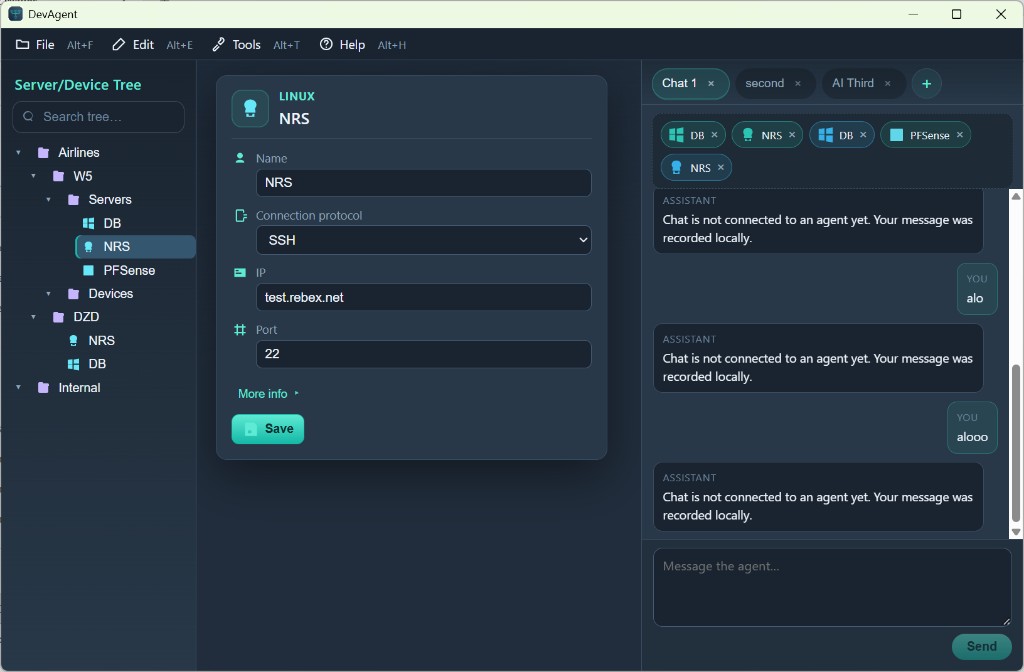
DevAgent desktop — fleet tree, connection profiles, and group-aware operations
First you structure the fleet. Then you act—on one machine or on every member of a group.
Structure
Build and maintain your server and device tree—groups, sites, hostnames, IP addresses, ports, and SSH profiles. Drag, organize, and keep connection details where your team expects them.
Execute
Select a server or a whole group and run commands, installs, and checks with AI assistance. Real-time output per host, shared intent—one job rolled out to many targets at once.
What makes DevAgent different
Other tools often focus on a single connection. DevAgent treats groups as first-class: pick “Central office → Servers”, define the task once, and execute across the set—install Docker, patch packages, or verify a service on every node.
Airlines, regions, offices, servers, and devices in a single hierarchy. Edit SSH settings per host, attach group context to chat, and switch from arranging topology to operating on the selection without changing apps.
Create free account
Names, IPs, ports, protocols—kept in the desktop vault. Your cloud account only sees metadata and job history, not secrets.
One instruction, many hosts. Built for rollouts, not copy-paste across terminals.
Pick a subscription plan, track credits, and choose AI models from your web dashboard.
The cloud holds accounts, plans, requests, and billing metadata—not your SSH passwords or private keys.
Download the desktop app and connect your platform account when you're ready for credits and teams.
Windows build · Linux coming soon